You can secure your account with an email, creating your Cross Platform POOL BLITZ account! Which means you can then pick up and play on any available device, with one account played seamlessly across all platforms. Currently Pool Blitz is available on; Android, iOS, and PS5, PS4, Xbox Series X|S, Xbox One and the Nintendo Switch.
To secure and link your account, follow the steps below:
To create a Pool Blitz account on Mobile:
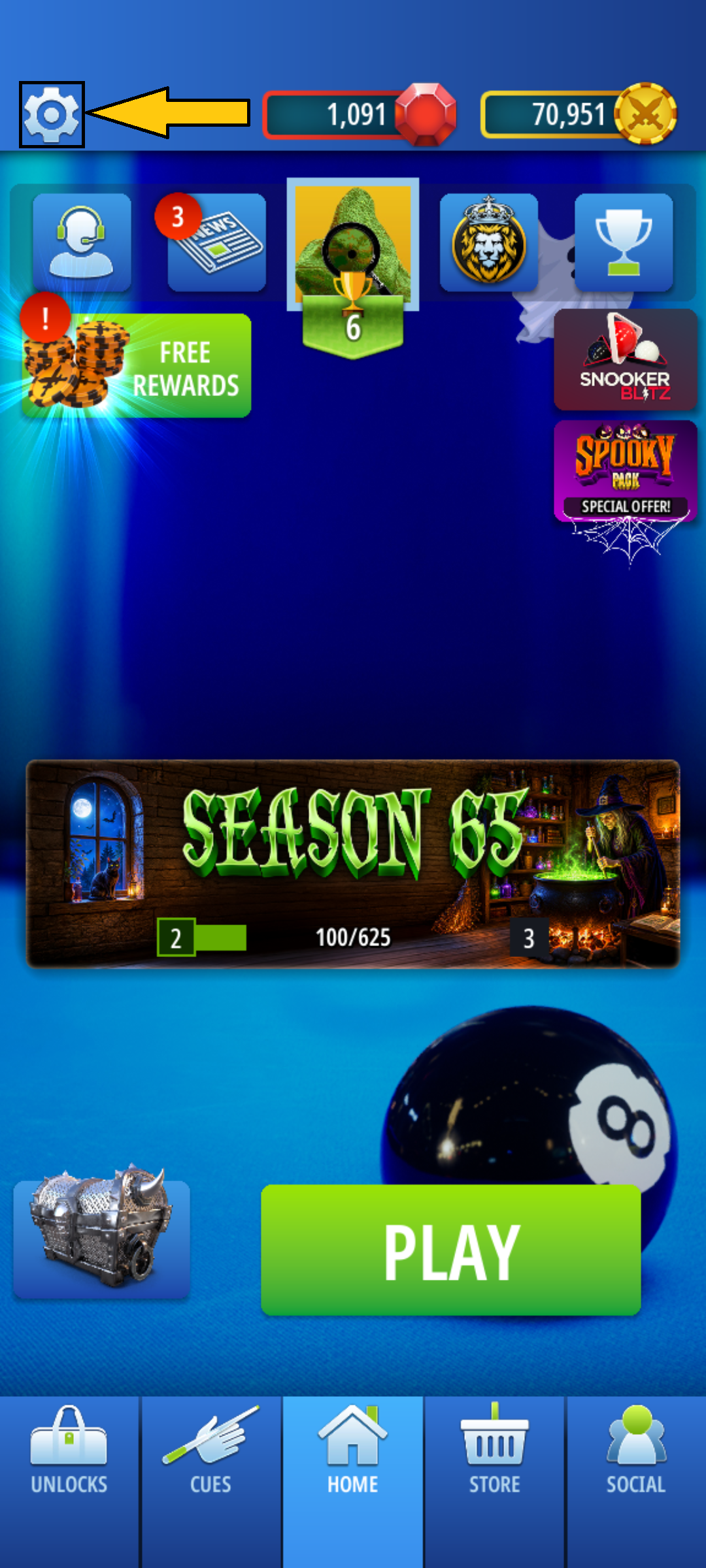
- Tap the Settings button (cog symbol - highlighted in yellow below) on the Home Menu.
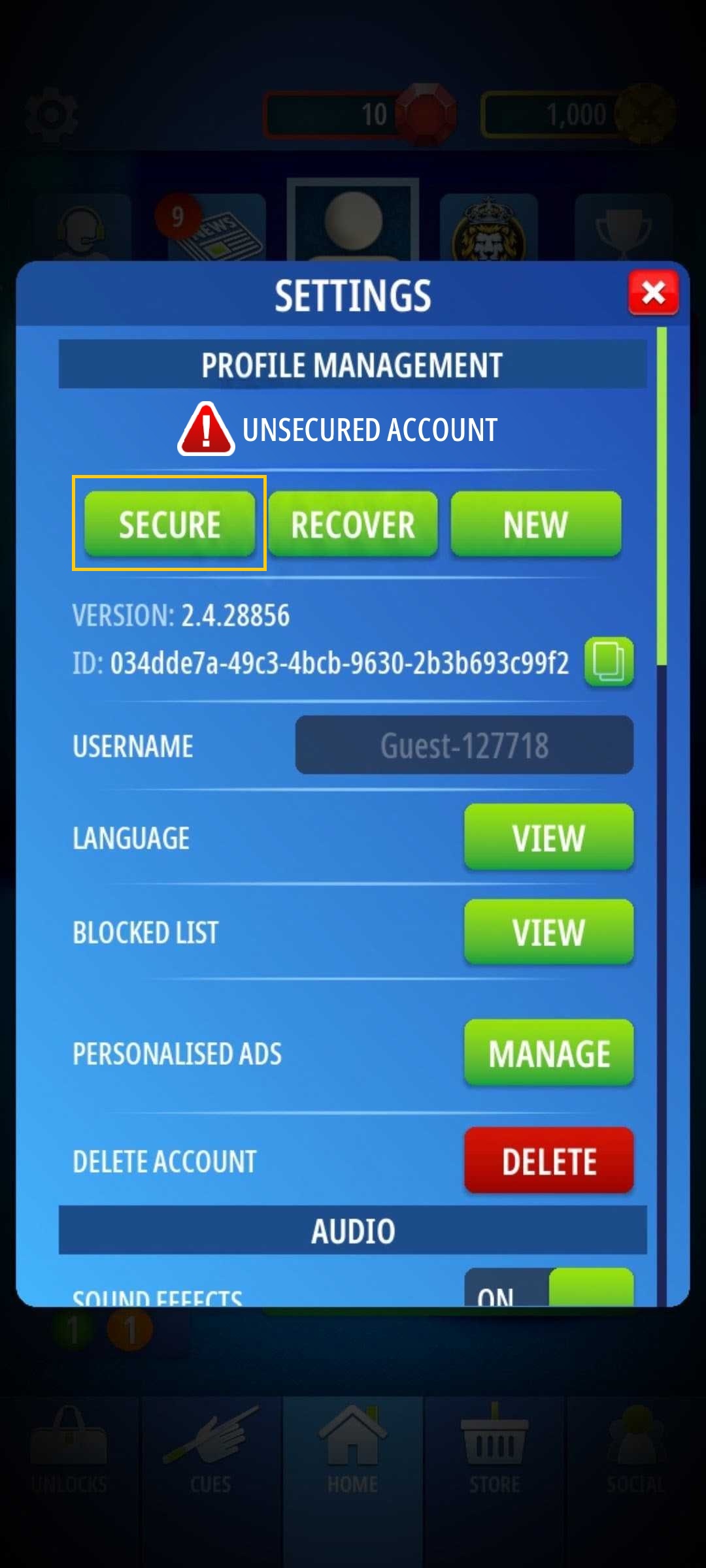
- Select the [Secure] button below Profile Management.
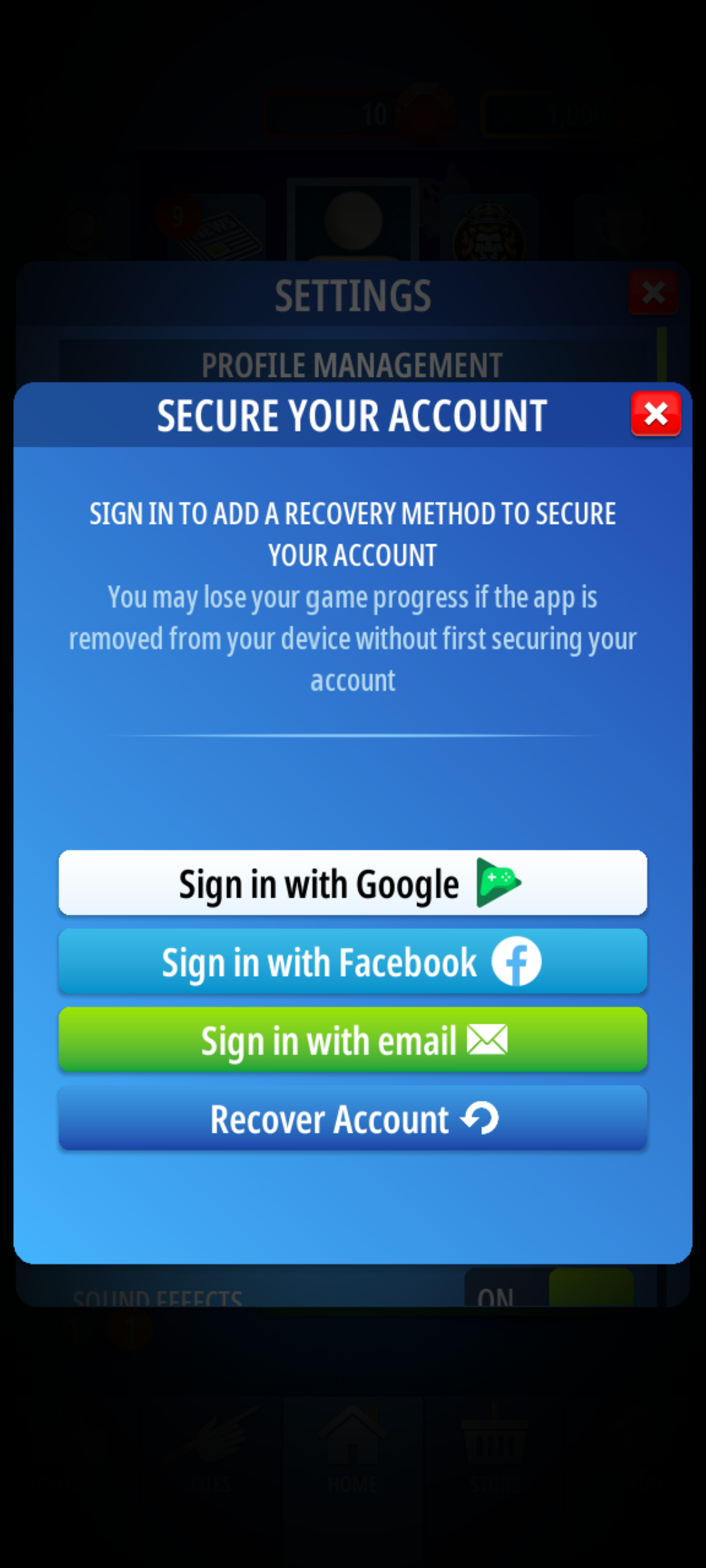
- On Android, you will be given 3 Options to Secure your Mobile account.
- Sign in with Google Play (Or Sign in with Apple if you are using an iOS device)
- Sign in with Facebook
- Sign in with email
- Tap on the method you prefer to secure your account.
Sign in with Google Play/Apple is best used if you want to link two mobile devices together which are the same make E.g. iPhone Pool Blitz account being linked to an iPad.

Sign in with Facebook can be used to secure your account and offers you the ability to use your Facebook profile picture as your in game avatar!

Sign in with email is designed for players to link their mobile, console or PC Pool Blitz account to any platform of your choosing!
To Link mobile account to console/PC, follow the step below:
- Tap Secure then tap Sign in with email
- Input your preferred Email address and Password, then tap confirm.
- Your Mobile account is now secured. Now you need to head over to your console/PC of your choosing.
- Head to the Settings Menu then Online settings and select the Account Link button.
- This will show the Link Account screen, if you tap Yes - Link account, it will ask you to input an email address and password.
- Input the Email and Password you used to secure your mobile account and select the Link account button.
Your account will then reload and sync all your progress to your console/PC account, meaning you can now play your account at home and on the go!
To Link Mobile account to another Mobile device:
Tap Secure then choose whichever method you want to link the account with. In the case of Mobile to Mobile linking, any of the options in the secure menu will allow this.
Once you have selected the method you want to use, follow the steps above in the Secure Mobile account section to secure you Pool Blitz account.
Then open Pool Blitz on your other Mobile Device.
Tap Settings and select the Recover Option.
Select the option that you used to Secure your account on the first device (e.g. Secure with Facebook, then choose the Recover with Facebook option)
In the case of Recover with Email, you just need to input the Email address and Password you used to secure the first account.
- Once you have logged in with your details whether that be on Facebook, using Sign in with Email or Google Play/Apple, the game will then find the corresponding Pool Blitz account that it was secured too and link it to both devices.
Your account will then reload and sync your mobile profile progress to your other mobile device, so you can now play your account on either device.
NOTE: Once your account is linked, you can only play on one device at any one time, if you try to use both at once, it will ask you to restart the game on the device you want to play on at that moment.
To recover an account:
To recover a lost mobile account that you secured previously is super simple.
- Tap on the Setting Cog in the Top right corner.
- Select the Recover button
- This will give you the options to either
- Recover using Google Play/Apple
- Recover using Facebook
- Recover using Email
- If you select the method that you used to Secure your account, such as if you secured your account with Facebook, you would choose the Recover using Facebook option.
- Recovering using Google Play/Apple will sign into your Google/Apple account and see if a Pool Blitz account was secured using this method and if one if found, it will be restored to your device!
- Recovering using Facebook will ask you to log into your Facebook account that you secured your Pool Blitz account too and once you sign in will recover the account.
- Recover with email will ask you to input the email address and password you used to secure your account, simply add your details to the pop-up and our servers will restore your lost account :)
Following these steps should help you get any lost account recovered back to you!
Need any further help with Account Linking/Recovery in Pool Blitz? Send in a support ticket in-game in the Customer Support Menu or email our support team at support@cherrypopgames.freshdesk.com and we will assist you in getting it sorted!
Was this article helpful?
That’s Great!
Thank you for your feedback
Sorry! We couldn't be helpful
Thank you for your feedback
Feedback sent
We appreciate your effort and will try to fix the article